Next to the recipe
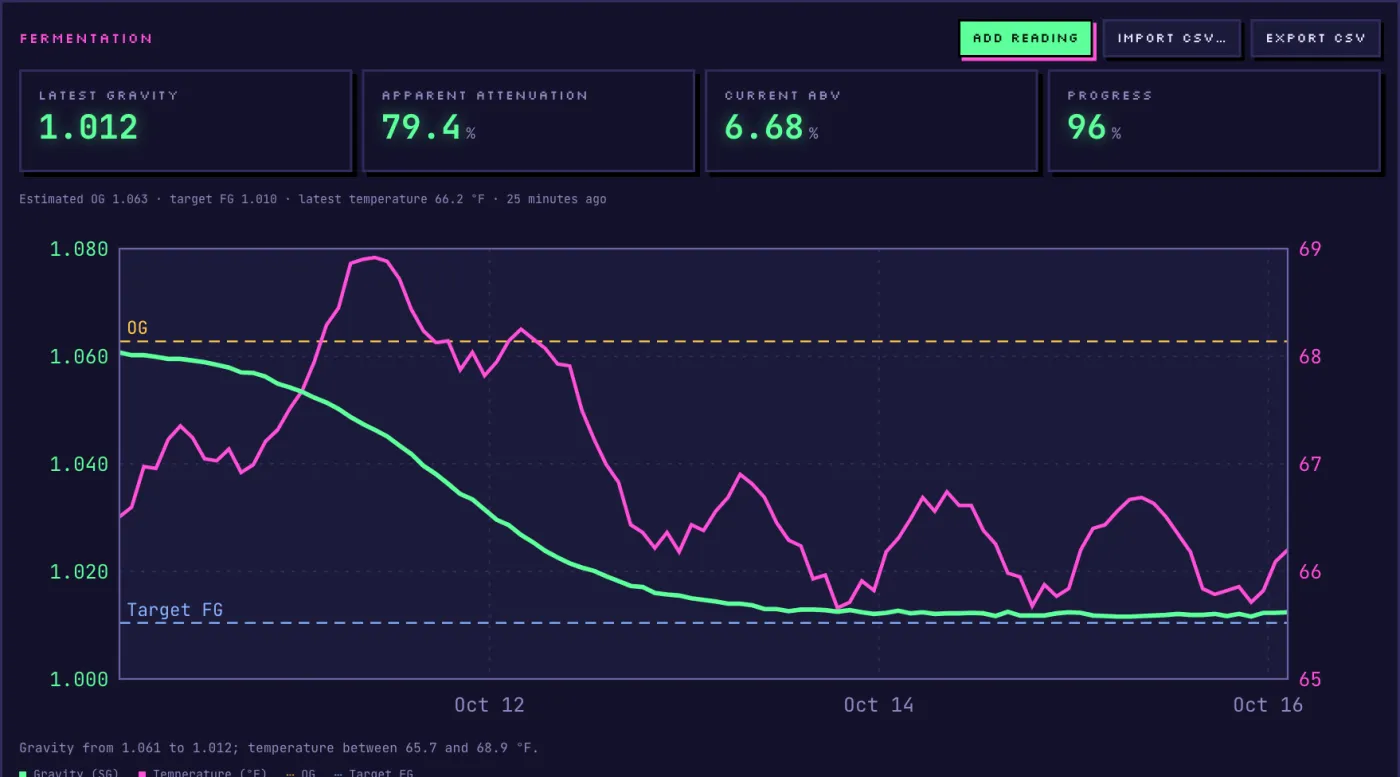
Readings sit next to the planned OG and FG, with the style's ranges.
Your Tilt broadcasts over Bluetooth; a TiltBridge or TiltPi relays it. Point that gateway at Mashwerk and each Tilt colour follows its batch live. A build-it-yourself Mashwerk sensor is on its way.
Start brewing freeThrough the gateway you already use.
In Mashwerk, open Sensors and add a Tilt gateway. One token covers all your Tilt colours.
Find the setting for the Brewfather custom stream URL.
Replace the Brewfather URL (log.brewfather.net/stream?id=…) with the address shown in Mashwerk.
Each colour received shows up as a device: assign it to its batch and readings land on the chart.
Each Tilt colour follows its own batch, with gravity, temperature, attenuation and progress.
Readings sit next to the planned OG and FG, with the style's ranges.
Computed live by the brewing engine from your readings.
“Is it done?”, “Why did it stall?”: answers from your actual curve.
Readings stay with the batch, exportable to CSV at any time.
Yes, the Tilt only speaks Bluetooth. Any gateway that can send the Brewfather custom stream works, including TiltBridge, TiltPi and Tilty.
Export it as CSV and import it into the batch: Mashwerk recognises the Tilt columns and colours.
A Tilt can be a few points off because of trub and foam, but its trend is very reliable. Calibrate it, then trust the curve rather than one reading.
The free plan includes one sensor; Amateur+ includes five sensors and unlimited history.

Free plan with one sensor and 90 days of readings, no credit card.
Start brewing free